Developer guide
Everything you need to work on SphereLoom. This is the public companion to the README: the README says what the project is, this says how to build it.
Architecture
SphereLoom is an MCP server that exposes one coherent tool surface for controlling Insta360 cameras and processing their 360° media, regardless of how the camera is connected. It targets Insta360 hardware specifically; it is not a generic 360° camera tool. What each capability can do today is listed in the capability matrix.
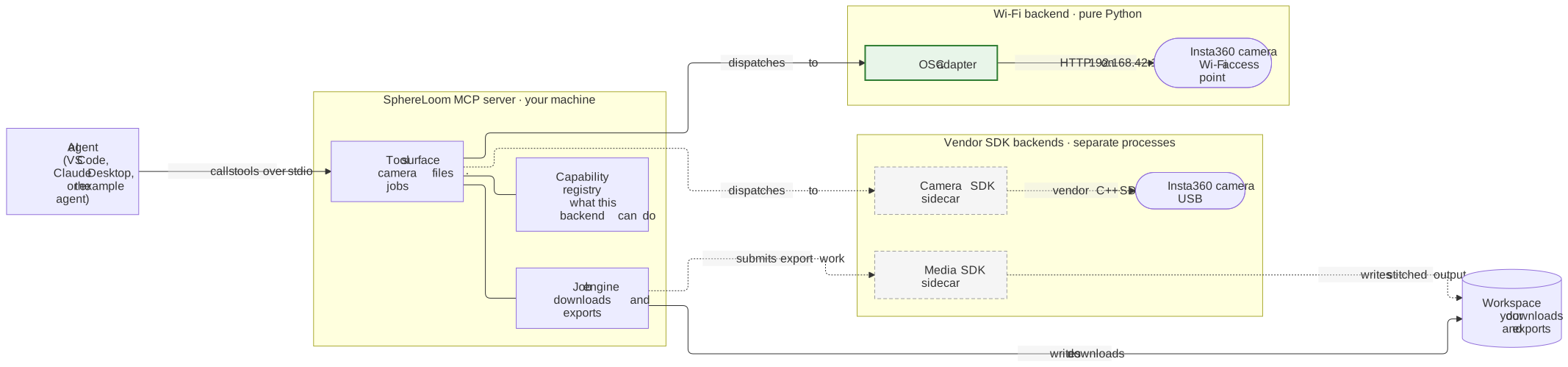
Legend. The green adapter runs inside the SphereLoom process and needs no vendor SDK. Grey boxes with dashed lines run as separate sidecar processes and need an Insta360 SDK you obtain yourself. Rounded boxes are physical cameras; the cylinder is a directory on your disk. Arrows point in the direction a request travels.
The diagram shows request flow, not deployment: every box except the cameras runs on your own machine.
The same structure, as packages. This is the design; some packages are not written yet, and the capability matrix shows what works today.
MCP client ──stdio──▶ SphereLoom server
                          │
                          ├─ tools/         MCP tool surface
                          ├─ capabilities/  what this backend can actually do
                          ├─ jobs/          long operations, with state
                          ├─ security/      path jail, confirmations, transport auth
                          └─ adapters/
                               ├─ osc/      Wi-Fi HTTP
                               ├─ fake/     loopback test double
                               └─ usb/      Camera SDK sidecar process
Design principles
- Ports and adapters. The tool layer depends on the
CameraPortandMediaPortprotocols and nothing else. Swapping Wi-Fi for USB changes no tool. - Capabilities are data. A backend declares what it supports. An unsupported operation returns a structured error that explains why and links to the Insta360 documentation, rather than failing opaquely or timing out.
- Long operations are jobs. Downloads and exports return a job identifier immediately that you poll and can cancel. Responses carry paths and metadata, never media bytes.
- Vendor SDKs run in sidecars. Each runs in its own process, so a native crash cannot end your agent session, and SphereLoom’s MIT code never links EULA-bound binaries.
- The core is deterministic. No language model runs inside the server. It needs no model credentials to start and costs nothing to poll; any MCP client works.
- Safe by default. stdio transport with no listener, a workspace path jail, confirmation tokens for destructive actions, bounded concurrency and logs that carry no untrusted text. HTTP access is opt-in and requires a loopback bind plus a token.
- Testable without hardware. A protocol-faithful fake camera runs the whole suite and doubles as a demo backend.
Requirements
- Python 3.12 or 3.13, installed with
uv. - Wi-Fi control is pure Python and runs on Windows, Linux and macOS.
- An Insta360 camera supporting the Open Spherical Camera API. Insta360 lists ONE X, ONE X2, ONE R, ONE RS, X3, X4, X4 Air and X5; development and testing target the X5.
- Features built on an Insta360 desktop SDK need a copy of that SDK you obtain and install yourself, and those SDKs do not support macOS. Media processing additionally needs a discrete NVIDIA GPU.
Getting started
No camera is needed to develop or run the test suite.
git clone https://github.com/jluqueba/sphereloom.git
cd sphereloom
uv venv --python 3.13
uv pip install -e ".[dev]"
Run every check CI runs:
make check        # Linux and macOS
.\check.ps1       # Windows
Individual steps, should you want them:
make lint         # ruff format --check, then ruff check
make typecheck    # mypy --strict
make test         # pytest, excluding the hardware tier
make coverage     # the same with a coverage report
make docs-lint    # markdownlint, needs Node
Confirm the server runs, and validate your configuration without launching it:
uv run --no-sync sphereloom --version
uv run --no-sync sphereloom --check-config
To register SphereLoom with an MCP client, run sphereloom over stdio. Configuration is
read from SPHERELOOM_* environment variables, every one of which is documented in
.env.example.
Project layout
src/sphereloom/
  cli.py          entry point and argument parsing
  config.py       settings model, validated once at startup
  logging.py      structured stderr logging from an allow-list of fields
  domain/         models, capabilities, errors, clock, identifiers
  ports/          CameraPort and MediaPort protocols
  security/       path jail, transport authentication
  server/         application assembly and transport selection
tests/
  unit/           fast, isolated, no I/O
  component/      the real server and real tools against a fake camera
  integration/    real hardware, opt-in only
docs/
  DEVELOPER_GUIDE.md   this file
  CAPABILITIES.md      what each capability can do today, its table generated from the registry
  assets/              diagrams: Mermaid source (.mmd) and the SVG rendered from it
  internal/            design records, encrypted at rest
Testing
The suite runs with no camera attached, and that is a deliberate constraint rather than a convenience. Two defaults enforce it:
- Outbound network access is blocked in tests. A test that reaches a real camera fails loudly instead of passing on one machine and failing elsewhere.
- Time and identifiers are injected, so nothing sleeps and nothing is random.
Tests are organised in three tiers:
| Tier | What it covers | Runs in CI |
|---|---|---|
tests/unit |
Pure logic: path jail, error taxonomy, configuration, logging | Yes |
tests/component |
The real MCP server and real tools against a fake camera on loopback | Yes |
tests/integration |
A real camera, marked @pytest.mark.hardware |
No, never |
The hardware tier is opt-in and requires both the marker and
SPHERELOOM_ENABLE_HARDWARE_TESTS=1. It is deselected in CI, so it cannot run by accident.
uv run --no-sync pytest -m "not hardware"   # the default
uv run --no-sync pytest -m hardware         # needs a real camera
Configuration
Every setting is an environment variable prefixed SPHERELOOM_, documented in
.env.example. Configuration is validated once at startup and failures
name the offending variable.
The defaults are the cautious ones: stdio transport with no network listener, destructive tools disabled, log redaction on as a second line of defence.
Security model
SphereLoom runs on your machine, against your camera, over a network you control. The guard rails protect your workflow and your filesystem:
- Transport. stdio by default, which opens no socket. HTTP is opt-in, requires a bearer token, and binding beyond loopback requires an explicit acknowledgement flag.
- Path jail. Every write is confined to a configured workspace. Parent traversal, absolute paths and escaping symlinks are rejected after full resolution.
- Confirmations. Destructive operations are disabled by default and require a single-use, target-bound token.
- Logging. Logs are structured events built from an allow-list of fields. Camera values, file contents, absolute paths, error messages and the text of other libraries’ log lines never reach them; a pattern filter for credentials, network names, query strings and absolute paths is a second line of defence. Logging goes to stderr only.
One thing to be clear about: the camera’s own API has no authentication. Anything on its access point can command it. SphereLoom cannot fix that, and does not pretend to.
Public site
The README and the public guides are published with GitHub Pages straight from main.
GitHub builds the site with Jekyll on every merge, configured by _config.yml; no workflow
in this repository is involved.
Jekyll publishes everything it is not told to exclude, so tests/unit/test_public_site.py
fails when a tracked top-level path, or an entry under docs/, is neither published on
purpose nor excluded:
- A new top-level code or tooling directory goes in the
excludelist in_config.yml. - A new top-level entry whose name starts with a dot or an underscore is skipped by Jekyll,
so it is classified rather than excluded: add it to the test’s list of known hidden
entries or, if it must be published, to the
includelist and the test’s list of required includes. - A new entry under
docs/goes either in the test’s list of publisheddocs/entries or in theexcludelist. - A published Markdown file named like a community file, such as
CONTRIBUTING.md, is served as raw text unless it is listed underincludeor starts with front matter.
The same test fails on Liquid template delimiters in published Markdown (two opening braces, or an opening brace followed by a percent sign), because Jekyll evaluates them; describe such syntax in words or link to the file instead. It also checks that the site header, shown on every page, repeats the README’s trademark notice.
Diagrams
Public documentation embeds diagrams as committed SVG images rendered from a Mermaid source
kept beside them in docs/assets/, never as inline Mermaid blocks: GitHub renders Mermaid,
but other places the documentation is shown do not. Keep diagrams in this guide, not in the
README.
Edit the .mmd file, then regenerate the image with Node.js installed:
python scripts/render_diagrams.py
Each image records the digest of the source it was rendered from, and
tests/unit/test_public_docs.py fails when a source changes without its image being
regenerated. Give every embedded diagram alt text that states what it shows.
Internal documentation
Design records — architecture decision records, feature specifications, technical plans,
task breakdowns and the product vision — live under docs/internal/ and are encrypted at
rest with git-age. Contributors without the key see
ciphertext.
This does not affect contributing. Everything needed to build, test and extend SphereLoom
is in this guide, in CONTRIBUTING.md, and in the path-scoped
instruction files under .github/instructions/. If a change needs design context you
cannot read, open an issue and ask; the relevant reasoning will be summarised in the issue
or the pull request.
Maintainers with the private key need nothing special: the git filter decrypts on checkout and encrypts on commit automatically.
Contributing
See CONTRIBUTING.md for branch naming, commit conventions and the pull request checklist. Three rules worth repeating:
- Everything in the repository is in English.
- No GPL-licensed dependencies, anywhere.
- Never commit Insta360 SDK binaries, and never copy code from Insta360 sample repositories, which carry no licence file.